Delivery partners
You don't need to build a fleet to sell delivery. With easydine, you connect partner delivery services and orders are dispatched automatically. Your team doesn't have to stop what they're doing to call a courier.
Already have your own couriers? No problem: you can run in-house delivery, work with partners, or do both at the same time.
Connect in a few steps
Go to Orders → Logistics in the panel and connect a delivery service that operates in your area. easydine is compatible with Open Delivery, an open standard in the Brazilian market. In practice, that means more partner options and no lock-in to a single service.
Automatic dispatch
You choose which order status calls the courier (for example, when the order moves to "Preparing"). You can also fine-tune:
- Delay: wait a few minutes before calling, to give the kitchen some breathing room.
- Business hours: automatic dispatch only kicks in while your business is open.
- Minimum order value: set an order value below which no courier is called.
- Declined payments: orders with a declined payment stay out of automatic dispatch.
When the order is ready, the courier is already on the way. Food spends less time on the counter and arrives hotter at the customer's door.
And the order moves itself
The way back is automatic too. Because every stage of your flow carries an industry-standard status (see status flow), the order follows the delivery without anyone dragging it on the board:
- when the partner collects the order, it moves to the stage you marked as Dispatched;
- when the partner reports the delivery as made, it moves to the stage you marked as Concluded.
If your flow does not have one of those stages, that is fine — the order simply skips that part and carries on to the next one it does have.
That applies to a delivery that actually happened. A refusal, a cancellation or a return never touch your order's status — cancelling involves a refund, an invoice and a conversation with the customer, and that call stays yours.
If the partner goes quiet
Partners do not always tell us. When that happens, easydine starts asking at intervals what became of the delivery, and updates the order when the answer arrives. You do not have to do anything.
If it still cannot be worked out, the delivery shows up under Orders → Logistics, in the Stalled deliveries list, with the reason in plain language. When there is still a partner to ask, the list offers a Check now button to do it right away.
If the partner is switched off, the list says so plainly and offers no button: there is no sense in asking a service you turned off. Re-enable the partner on the same screen and tracking resumes on its own.
More than one partner? You decide the order
With several services connected, choose how to split the orders:
- Round robin: orders alternate between partners.
- Primary and backup: one partner gets everything; if it can't take the job, the backup steps in automatically.
That way, if one partner goes down, another takes over the orders automatically.
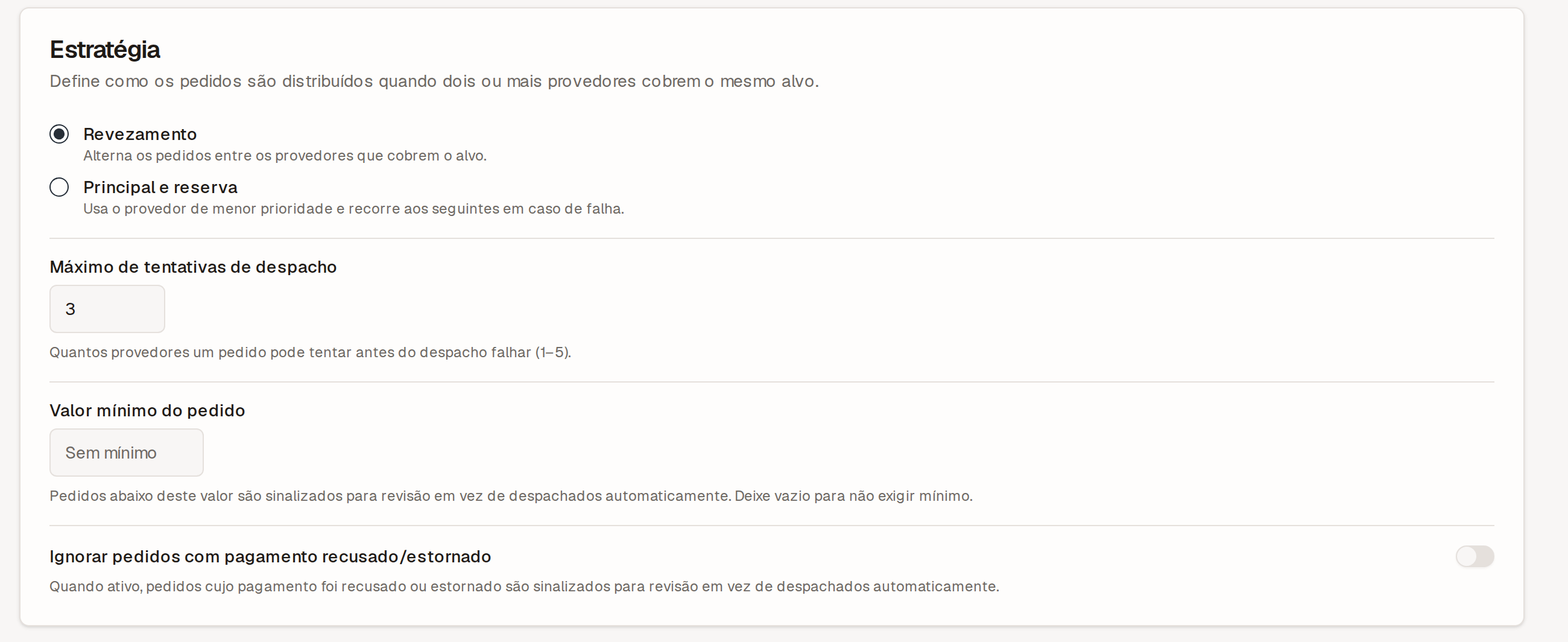
The panel also shows each partner's track record — success rate and response time — so you can decide who to work with.
Live tracking
You follow each delivery in real time from the panel, from dispatch to the customer's door. At handoff, a confirmation code shows the order reached the right person and cuts down on "it never arrived" disputes.
Every courier step gets its own name instead of being lumped into "on the way":
| What the panel shows | What is happening |
|---|---|
| Requested | The order went to the partner, who has not answered yet. |
| Rejected | No courier accepted the job. |
| Failed | The dispatch never got off the ground. |
| Accepted | The partner took the job. |
| On the way to the store | A courier is heading over to collect it. |
| Courier at the store | They arrived and are waiting for the handoff. |
| Picked up | They left with the order. |
| In transit | On the way to the customer. |
| Arrived at the customer | At the door, not handed over yet. |
| Delivered | The customer received it. |
| Delivery finished | The partner closed the job on their side. |
When something goes wrong on the way, the panel also tells Returning to the store apart from Returned to the store — the second one means the order came back and the customer never got it, which is not the same as a cancellation.
A Rejected job, or one that Failed, is not retried on its own. The moment the panel shows it, the order is yours to resolve — deliver it with your own team, or talk to the customer.
Your customer follows along too
On the order tracking page, the customer sees a second line branching off the first with the delivery's progress: finding a courier, on the way to the store, order picked up, on the way to their address, delivered.
When a delivery ends badly — nobody accepted it, it was cancelled, it came back to the store — they read that in plain words instead of watching "finding a courier" forever. On those states the page also shows the contacts you published for the store, so they can reach you on WhatsApp or by phone. If you published no contact, nothing shows up there.
It only shows up when the delivery went to a partner. If you deliver with your own fleet, the customer keeps seeing just the statuses you configured, with no branch at all.
The courier's details do not reach the customer — name and phone stay in your panel.
Delivery partners are part of the full orders module, available on the Completo plan. Compare at plans.