Delivery with online payment
With easydine, delivery happens right on your online store: the customer builds the order, pays by card or Pix, and follows everything from their phone. The customer is yours and the money goes straight to your bank account.
Want to see what your customer sees? Browse the menu on the demo store and place a test delivery order from start to finish, payment included. Everything works just like your own store, with one difference: nothing is charged and nothing is prepared or delivered. Use fictitious details, never a real card.
How it works
From order to delivery, everything is recorded in your panel. You just prepare the food. easydine takes care of the rest.
What the customer sees at checkout
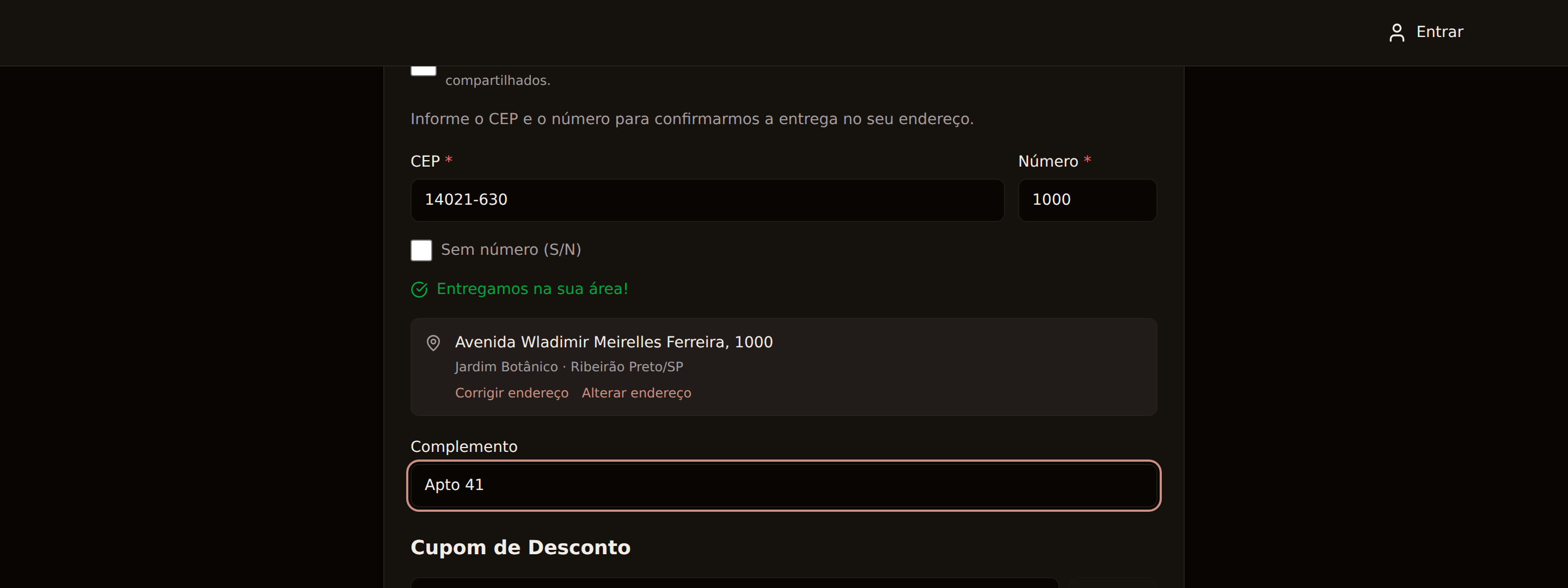
- Address from the postal code: the customer enters their CEP (Brazilian postal code) and the address fills in straight away — street, neighborhood, city and state. The postal code and the street number sit side by side, and while the number is missing the screen says so plainly instead of leaving the customer to guess. All that's left is the street number and any unit details.
- Addresses with no street number: a smallholding, a farm, an unnumbered stretch of road, a shop that never had a number. The customer ticks Sem número (no street number) and carries on: the order records S/N in place of the number — which is what shows in your panel, on the printed ticket and in the address the courier receives — and the delivery-area check uses the street instead. Before this, those customers had to invent a number, and an invented number is a delivery to the wrong place.
- Saved addresses checked before the order: a returning customer picks a saved address and the delivery-area check happens right there, at the moment they choose it — not at the end of the checkout. Addresses saved before the street number was kept as its own field may not carry it: when the number cannot be read from the address line, the store does not guess. The customer is told it could not be confirmed and can enter the address again there, with postal code and number, and the order goes through as usual.
- Radius-based delivery zone: you set how far you deliver, measured from your address. Anyone outside the radius can't even place the order, so you never have to turn down a delivery after the fact. If your customer's address cannot be confirmed at that moment, the order is not placed either: they see a notice asking them to try again shortly, rather than an accepted order you would not be able to deliver.
- Correcting the address: when the postal code fills in a street name your customer does not know, they can adjust the street, neighborhood and city right on the checkout, and pick the state from a list. If you have set a delivery radius, the correction is checked before the order is accepted: when we cannot confirm that the street belongs to the postal code they entered, they are told and can try again. This happens more often in new subdivisions and gated developments, where the map does not know the postal code yet. With no radius set, the correction is accepted as written — the same rule as the delivery area itself, which also only applies once a radius exists. The "customer corrected the address" note appears on the order as an explanation, in case the delivery is hard to find.
- Minimum order and delivery fee: amounts you define, shown clearly before payment. When the cart falls short of the minimum, the checkout says how much is missing rather than only that something is. And if a coupon is what took the total below the minimum, the message says so: the customer chooses between adding to the order and giving up the coupon, instead of guessing why a cart that looks big enough will not go through.
- Unit details and neighborhood kept with the address: apartment, block, rear house — and the neighborhood, which does not fit on the street line. The customer types it at checkout or keeps it on a saved address, and it shows on the order in your panel, prints on the ticket, travels to the courier and appears on the customer's own order tracking page, so they can check it — nobody has to ring to ask which flat it is.
- Promotions visible at checkout: when an item is on promotion, the checkout shows the full price struck through beside the discounted one, and states how much the promotions took off the order. Your customer does not have to do the arithmetic to find out they were getting a discount. And the basket's prices are re-checked with your store before payment: a promotion that started (or ended) after the customer built their cart shows at checkout with the right amount, without them having to reload the page.
- Discount codes: the customer applies the code at checkout and sees, right away, the discount — or the reason it does not apply. Every refusal says which one it is: an expired coupon names the date and the time it ran out, in the store's timezone (a lunch campaign that ended at 14:45 no longer looks valid to someone ordering dinner); a coupon with a minimum says how much is still missing; and a coupon that does not stack with the menu promotion says which of the two won — whether the promotion was worth more, whether the coupon was worth more and replaced it, or whether the two come to exactly the same discount.
- No retyping: whatever the customer fills in stays on their own device while the tab is open, so reloading the page loses nothing. And anyone who ticks "save my details on this device" keeps their name, email, and phone for 30 days, ready for the next order. That box is never pre-ticked, the CPF is never kept this way, and a link at checkout clears everything straight away — the shared-device case.
- Delivery fee summary box: Brazilian law requires transparency about what delivery costs and who receives it (Portaria SENACON/MJSP nº 61/2026). On easydine, this box comes ready-made in your store. You don't have to set anything up.
Order as a guest or create an account
Your customer doesn't need an account to order. They fill in the delivery details, pay, and that's it — the order lands in your panel right away. Fewer steps on the way to payment means fewer people dropping off midway.
Anyone who prefers can create an account to track their orders and save addresses. And someone who already ordered as a guest can create the account later using the same email: for security, access is only granted after the person confirms the email through the link we send. That way, no one takes over someone else's registration.
Every customer — with an account or as a guest — is gathered under Orders → Customers in the panel, with name, email, and phone. It's your customer base, always yours.
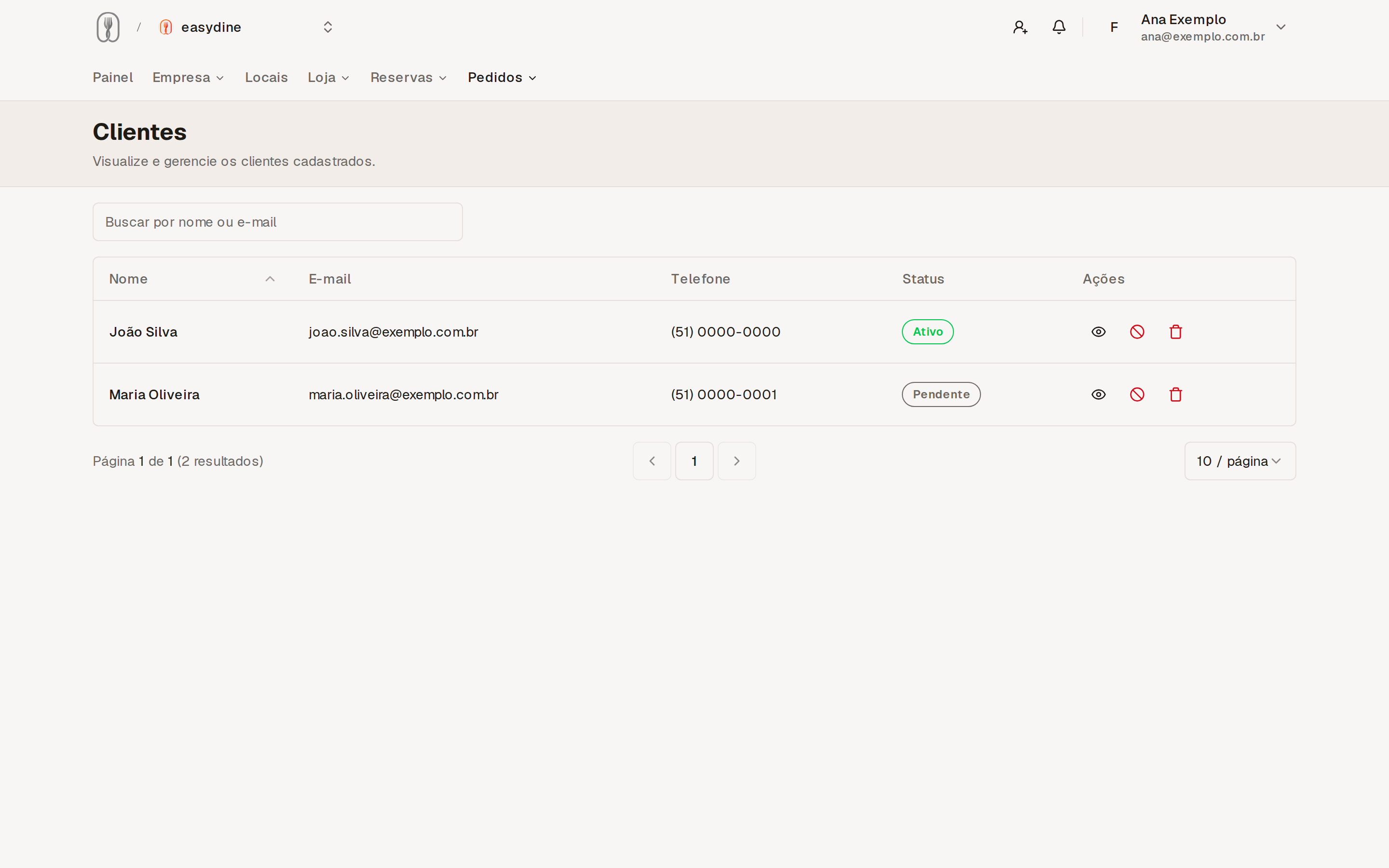
Open a customer and you see how many orders they have placed, how much they have spent in total, the date of their last order, the order history with dates, and the addresses their deliveries went to. Addresses show up even when the customer ordered as a guest, because they come from the orders themselves.
Each customer carries their standing: Guest (ordered without creating an account), Email not confirmed (signed up, has not confirmed yet), Active or Banned. Banning a customer stops new orders from that email at your store. The block applies to that person's email only, so banning someone never catches whoever shares their address. A banned person is not told they were banned: the screen just says the order could not be accepted and that nothing was charged.
Email news: the customer chooses to join and chooses to leave
The "I want to receive news" box is never pre-ticked at checkout — anyone who wants news has to tick it.
Once ticked, it holds until the customer asks to leave. Leaving the box empty on a later order cancels nothing: plenty of people rush through checkout, and an empty field is not a request to leave. To leave, the customer clicks the unsubscribe link carried by every news email. And anyone who left starts receiving again if they tick the box on a future order.
In the panel, the customer's record shows their current standing under Orders → Customers, so you know who may receive news before you prepare anything.
Online payment and the 10% fee
Card and Pix payments are processed securely by our payment partner, and the money goes straight to your bank account.
The fee is 10% on orders paid online, processing included, and it is the same for card and Pix. There is no other charge on top of that. It's charged automatically, once per sale, and it also applies during the 30-day free trial. Dine-in orders (QR code) and reservations carry no fee at all.
Want the details? See payments and fees.
On the card screen
Three things happen there so the customer does not give up at the last step:
- Each field speaks for itself. Number, name, expiry date and security code are checked as soon as the customer leaves the field, with the message under the field that is wrong — instead of a single "check the card details" at the end, which does not say which one.
- The customer knows what will appear on the statement. The screen and the confirmation email show the name that goes on the card statement, so "I do not recognize this charge" has an answer before it becomes a dispute with the card issuer. None of this appears for a Pix payment, because there is no card statement.
- A refused card is not a lost order. When the issuer refuses and we are certain nothing was charged, the screen offers paying with Pix in one tap, with the same cart and the same amount. When that certainty is not available, the screen offers to check the payment instead of charging again.
Protections against duplicate payment
Three common situations are handled automatically, with nothing for you to set up:
- The customer goes back and reorders while a payment is still open. This covers both Pix and card. Instead of raising a second charge, the checkout shows the payment that is already open and takes the customer to it. If they choose to start over anyway, we tell them first that the previous payment stays valid until it expires and that they should complete only the new one.
- The customer tries to pay again while confirmation is under way. By then the money may already have left their account, so the checkout does not offer to start over: it shows a calm note that we are confirming, and takes the customer to the payment to follow it.
- The customer leaves the tab open and the amounts change. If you change prices or remove an item from the menu while someone is at the checkout, the customer sees a note with the updated amount when they come back to the tab and is asked to refresh the page. The amount charged is always the one on your menu at the moment of payment — never what was on screen.
Real-time order tracking
As soon as the order is confirmed, the customer receives a confirmation email with a link to the public tracking page: they watch the status change in real time (received, preparing, out for delivery) without having to call and ask "where's my order?".
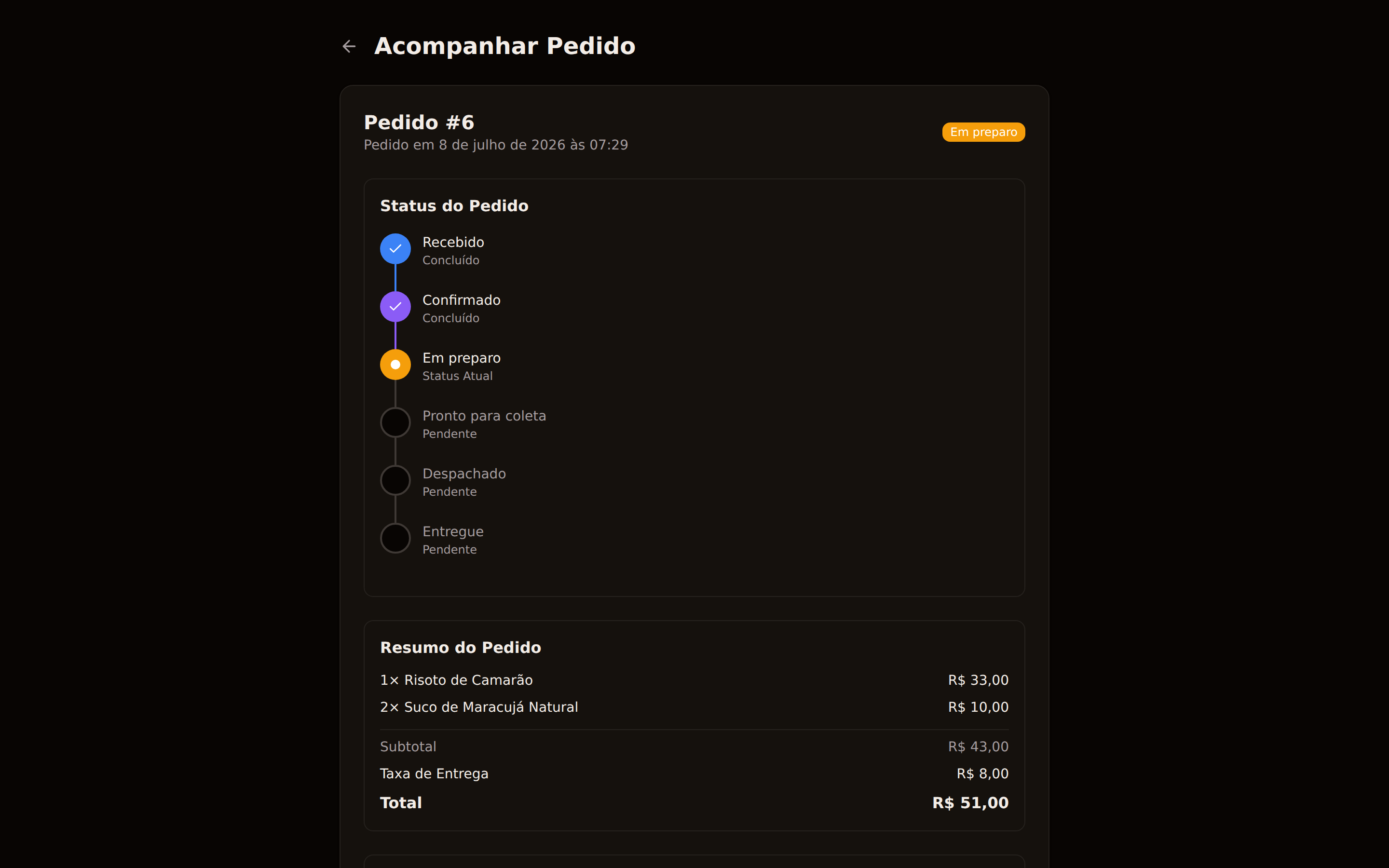
When the order goes out with a partner delivery service and that partner offers its own tracking page, the link to it appears alongside the delivery progress — for the customer on the tracking page, and for you on the order in your panel. On the tracking page it is shown prominently, with a button to open it and a button to copy the address. Not every partner offers one; when there is none, nothing else about the tracking changes.
On top of that, when the courier leaves with the order the customer gets an email about it — with the order number, the store's name and the partner's tracking link. It is one email per order: if the partner offers no tracking page the email is not sent, because there would be no link to show. The tracking page remains the complete source of progress.
The link does not carry the email with it. When the customer opens the page on another device, in another browser, or gets the link from someone else, the page asks for the order's email before showing anything — and remembers the answer on that device for next time. That way a link forwarded to the family group chat does not hand over the buyer's address and phone number.
Delivery estimate
You tell easydine how long each distance band usually takes, and the customer sees the estimate for their own order on the tracking page.
In Orders → Configurations, under Delivery zone, there is a minutes field for every km of your delivery radius: up to 1 km, up to 2 km, and so on. Fill them in with the time for the whole process — kitchen preparation, packing, assigning the courier and the drive — not just the time on the road. That is the number the customer reads.
A band can never be quicker than the one before it: a farther delivery does not arrive sooner than a nearer one. If you type the values out of order, the panel tells you instead of silently reordering them.
For the estimate to appear, the venue needs its coordinates filled in, on the same screen. Without them the distance of each order cannot be measured, and no estimate is shown.
The customer sees the expected time with a "~" in front of it. How busy the kitchen is and traffic both change the real time, and orders whose distance could not be measured show no estimate at all — we would rather show nothing than a wrong time.
Where to set it up
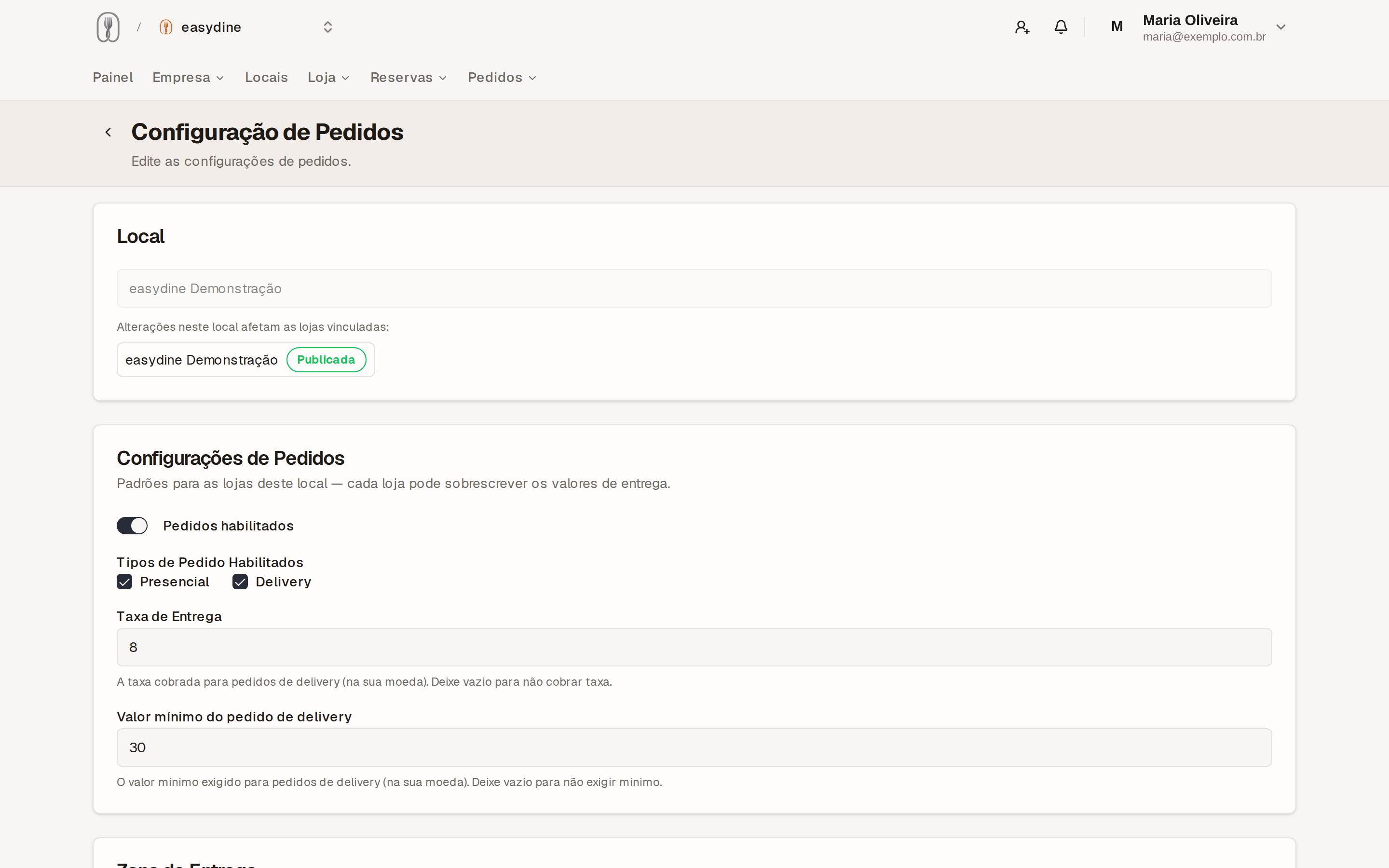
Go to Orders → Configurations in the panel. That's where the delivery values live:
| Setting | What it defines |
|---|---|
| Delivery fee | What the customer pays for delivery |
| Minimum order | The smallest amount a delivery order can total |
| Radius-based delivery zone | How far you deliver, measured from your address |
| Delivery time per band | How many minutes each distance band takes, from preparation to the door |
| Value inheritance | The organization default applies everywhere; a location or store can set its own values |
The most specific value always wins: set the default once and only adjust the exceptions.
You can deliver with your own team or connect partner delivery services, with automatic dispatch. See delivery partners.
The full orders module (delivery and dine-in QR) is part of the Completo plan. Compare at plans.